
This lecture explains how to make use of IF THEN ELSE statements in SAS, together with some examples.
Task 1 : Suppose you are asked to remove some observations from a SAS data set of an analysis you are doing. For example, you want to delete all the IDs whose values are larger than 100.
In order to complete this task we can use the following IF, IF-THEN DELETE statements.
Comparison Operators
IF (condition is true) => It means subsetting a dataset.
The output is shown below :
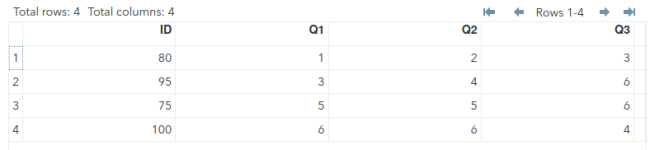
IF ID <= 100 This will be the statement that would tell SAS to retain only those IDs whose values are less than or equal to 100. That is, you remove IDs whose values are greater than or equal to 100.
This could also be done using an IF-THEN DELETE statement.
2. IF-THEN DELETE
IF (condition is true) THEN (delete the selected observations);
IF ID > 100 THEN DELETE => This would tell SAS to remove all the IDs whose values are greater than 100.
The output is shown below :
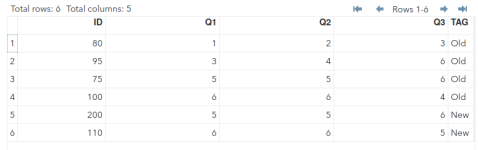
Task 2: You want to set a tag on all the IDs. The condition is :
If the value of ID is less than or equal to 100 then set "Old" tag otherwise set "New" tag.
IF (condition is true) THEN (perform this action);
ELSE (perform the action that is set when condition is false);
The output is shown below :
Task 3: You are given the assignment of updating the TAG column.
The conditions for tagging are as follows:
If the value of ID is less than 75, then TAG = "Old"
If the value of ID is greater than or equal to 75 but less than 100 then TAG = "New"
If the value of ID is more than or equal to 100 then TAG = "Unchecked"
IF condition is true THEN do this;
ELSE IF do when second condition is true;
ELSE IF do when third condition is true;
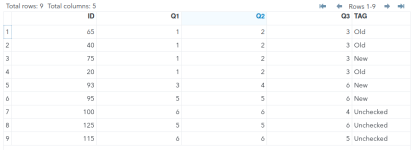
The output is shown below :
LOGICAL OPERATORS
Task 4: Suppose you want to generate an analysis for Q1 including only responses that are valid (non-missing) and less than 3.
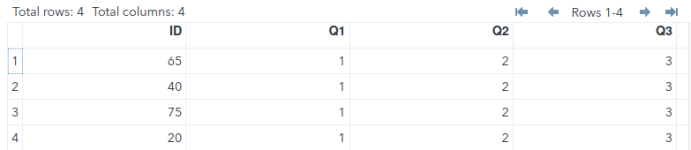
IF Q1 < 3) AND Q1 ^=.) THEN Since missing values are smaller than any other value, we have to instruct SAS to separate missing values into its own category.
The output is shown below :
Selecting Multiple Observations :
Assuming you want to set the tag "Incorrect" to the given IDs 1,5,35,70
For this scenario, the logical statement would take the form of any of the following statements. There are three ways it could be written as shown:
IN Operator
IN operator allows selecting multiple values of the same variable. It serves as a very good substitute of OR operator.
Task 1 : Suppose you are asked to remove some observations from a SAS data set of an analysis you are doing. For example, you want to delete all the IDs whose values are larger than 100.
In order to complete this task we can use the following IF, IF-THEN DELETE statements.
Comparison Operators
| Symbolic | Mnemonic | Meaning | Example |
| = | EQ | equals | IF gender = ‘M’; or IF gender EQ ‘M’; |
| ^= or ~= | NE | not equal | IF salary NE . ; |
| > | GT | greater than | IF salary GT 4500; |
| < | LT | less than | IF salary LT 4500; |
| >= | GE | greater than or equal | IF salary GE 4500; |
| <= | LE | less than or equal | IF salary LE 4500; |
| in | IN | selecting multiple values | IF country IN(‘US’ ’IN’); |
Data intellectsage;
Input ID Q1-Q3;
cards;
80 1 2 3
95 3 4 6
75 5 5 6
100 6 6 4
200 5 5 6
110 6 6 5
;
Data intellectsage1;
Set intellectsage;
IF ID <= 100;
run;
The output is shown below :
IF ID <= 100 This will be the statement that would tell SAS to retain only those IDs whose values are less than or equal to 100. That is, you remove IDs whose values are greater than or equal to 100.
This could also be done using an IF-THEN DELETE statement.
2. IF-THEN DELETE
IF (condition is true) THEN (delete the selected observations);
Data intellectsage;
Input ID Q1-Q3;
cards;
80 1 2 3
95 3 4 6
75 5 5 6
100 6 6 4
200 5 5 6
110 6 6 5
;
Data intellectsage1;
Set intellectsage;
IF ID > 100 THEN DELETE;
run;
IF ID > 100 THEN DELETE => This would tell SAS to remove all the IDs whose values are greater than 100.
The output is shown below :
Task 2: You want to set a tag on all the IDs. The condition is :
If the value of ID is less than or equal to 100 then set "Old" tag otherwise set "New" tag.
IF (condition is true) THEN (perform this action);
ELSE (perform the action that is set when condition is false);
Data intellectsage;
Input ID Q1-Q3;
cards;
80 1 2 3
95 3 4 6
75 5 5 6
100 6 6 4
200 5 5 6
110 6 6 5
;
Data intellectsage1;
Set intellectsage;
IF ID <= 100 THEN TAG ="Old";
ELSE TAG ="New";
run;
The output is shown below :
Task 3: You are given the assignment of updating the TAG column.
The conditions for tagging are as follows:
If the value of ID is less than 75, then TAG = "Old"
If the value of ID is greater than or equal to 75 but less than 100 then TAG = "New"
If the value of ID is more than or equal to 100 then TAG = "Unchecked"
IF condition is true THEN do this;
ELSE IF do when second condition is true;
ELSE IF do when third condition is true;
Data intellectsage;
Input ID Q1-Q3;
cards;
65 1 2 3
40 1 2 3
75 1 2 3
20 1 2 3
93 3 4 6
95 5 5 6
100 6 6 4
125 5 5 6
115 6 6 5
;
Data intellectsage1;
Set intellectsage;
length TAG $20;
IF ID < 75 THEN TAG ="Old";
ELSE IF 75 <= ID < 100 THEN TAG = "New";
ELSE IF ID >= 100 THEN TAG ="Unchecked";
run;
The output is shown below :
LOGICAL OPERATORS
| Symbolic | Mnemonic | Meaning | Example |
| & | AND | Both conditions true | IF gender =’M’ and age =1; |
| | | OR | Either condition true | IF gender =’M’ or age =1; |
| ~ or ^ | NOT | Reverse the statement | IF country not IN(‘US’,’IN’); |
Task 4: Suppose you want to generate an analysis for Q1 including only responses that are valid (non-missing) and less than 3.
Data intellectsage;
Input ID Q1-Q3;
cards;
65 1 2 3
40 1 2 3
75 1 2 3
20 1 2 3
93 . 4 6
95 5 5 6
100 6 6 4
125 . 5 6
115 6 6 5
;
Data intellectsage1;
Set intellectsage;
IF (Q1 < 3) AND (Q1 ^= .);
run;
IF Q1 < 3) AND Q1 ^=.) THEN Since missing values are smaller than any other value, we have to instruct SAS to separate missing values into its own category.
The output is shown below :
Selecting Multiple Observations :
Assuming you want to set the tag "Incorrect" to the given IDs 1,5,35,70
For this scenario, the logical statement would take the form of any of the following statements. There are three ways it could be written as shown:
IF ID=1 OR ID=5 OR ID=35 OR ID=70 THEN TAG="INCORRECT";
IF ID IN (1 5 35 70) THEN TAG="INCORRECT";
IF ID IN (1, 5, 35, 70) THEN TAG="INCORRECT";
IN Operator
IN operator allows selecting multiple values of the same variable. It serves as a very good substitute of OR operator.
Last edited: